A pattern featuring green and white polka dots arranged uniformly across the surface.

Workflow builder

Automate your work with AI tools

Automate your work with AI tools

View, edit, and organize workflows quickly from a single pane in your dashboard with filters and search tools.

View, edit, and organize workflows quickly from a single pane in your dashboard with filters and search tools.

Diagram outlining the process for using the new features in a clear, step-by-step format.

Smarter automation

Why this feature helps you build faster

Cloves removes the friction from starting new workflows so your team can launch, iterate, and scale automation.

Create workflows visually

Drag, connect, and configure triggers, conditions, and actions in a clear visual canvas—absolutely no code needed.

Make smarter decisions faster

Leverage AI to analyze context, behavior, and real-time data to trigger the most effective next action.

Connect triggers to actions

Automatically instantly seamlessly run tasks when events happen—new leads, updates, payments, or form submissions.

Monitor and refine workflows

Track what runs, what changes, and what AI handles—so you can optimize workflows effortlessly confidently.

Real use cases

See real workflows built with this feature

Practical automation examples showing how teams use this feature in everyday workflows.

 A monochrome design showcasing small dots arranged in a repetitive pattern against a white backdrop.
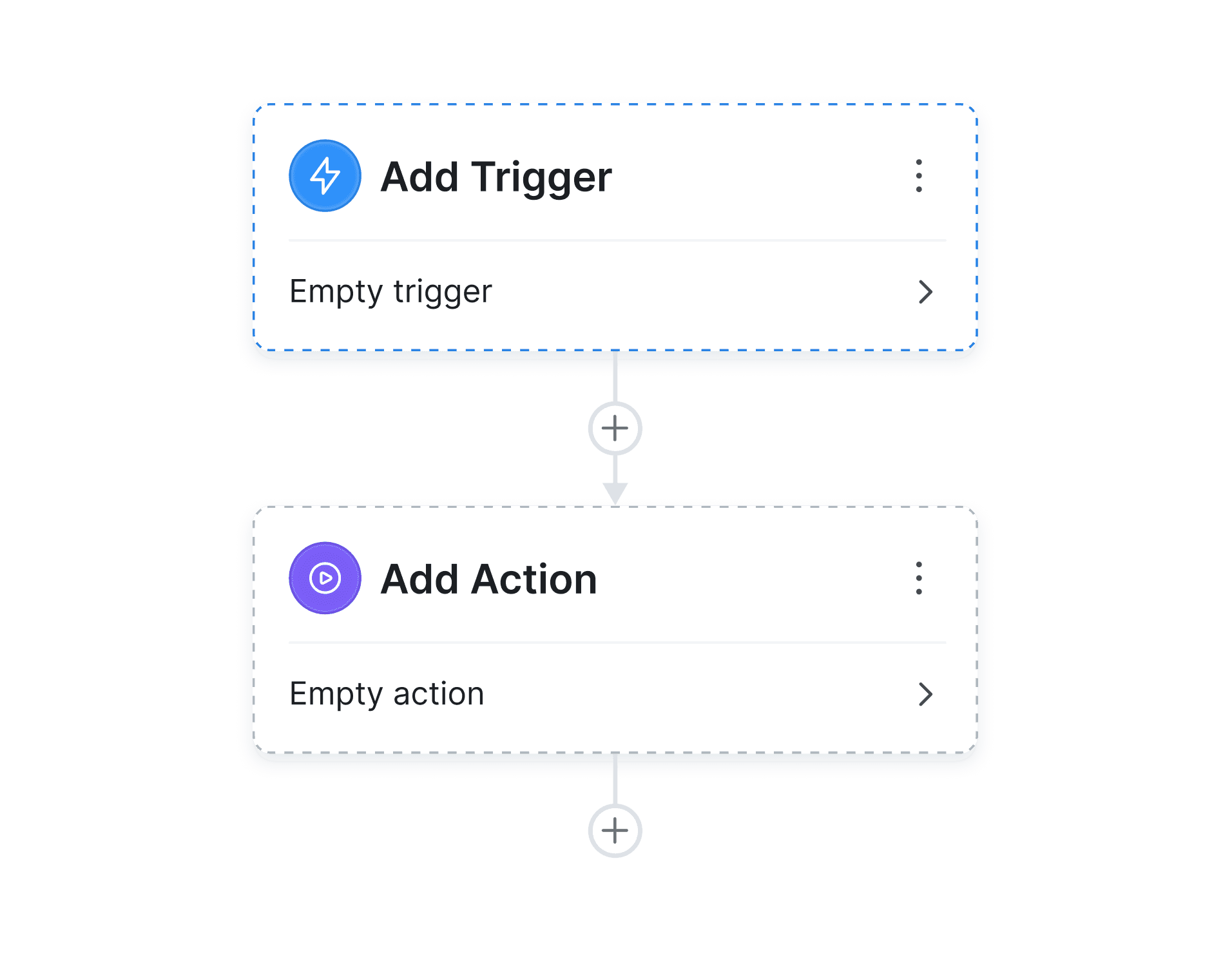
Two monitors featuring the add action interface and the add action buttons for functionality demonstration.
Diagram depicting different data types, highlighting structured, unstructured, and semi-structured data relationships.
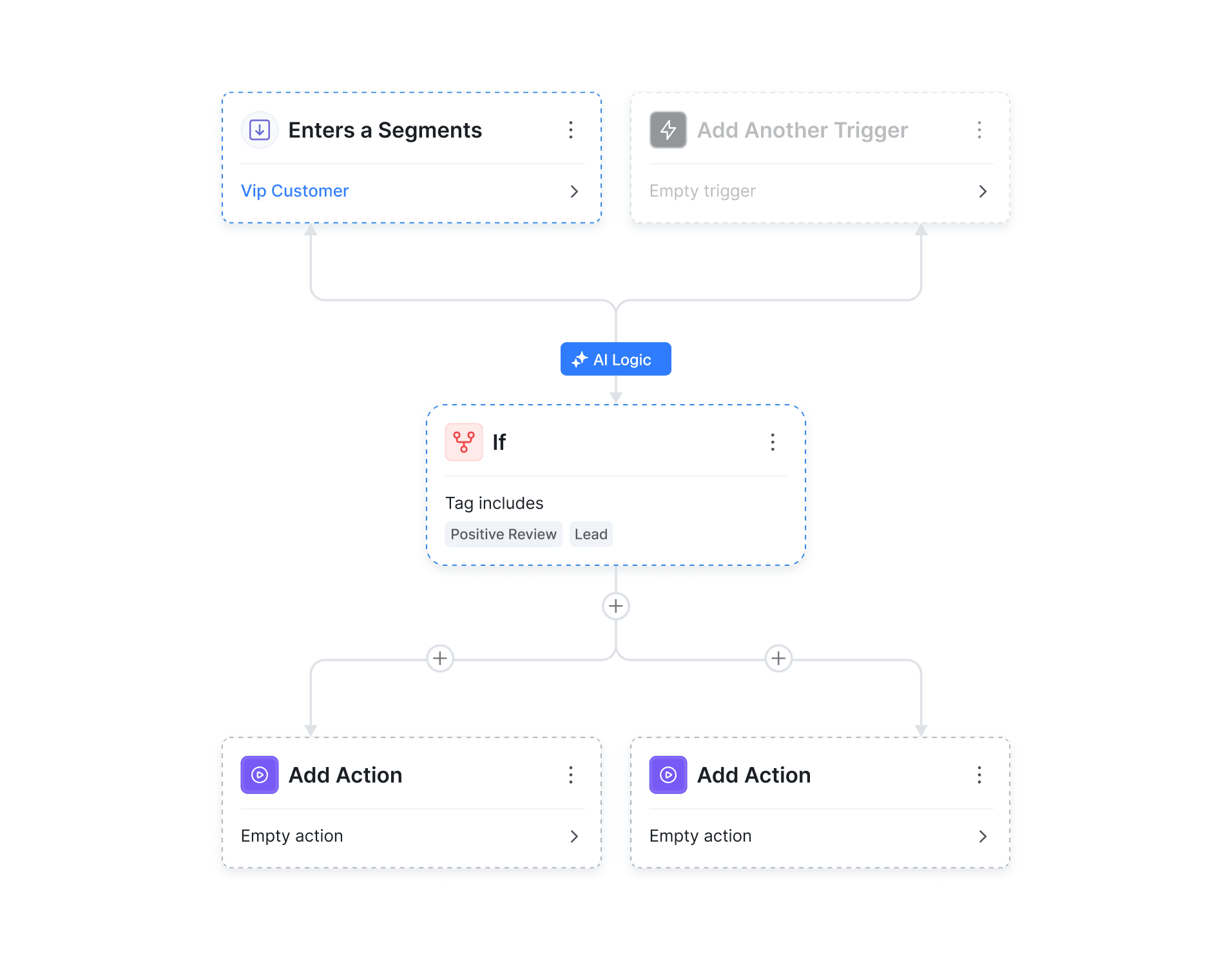
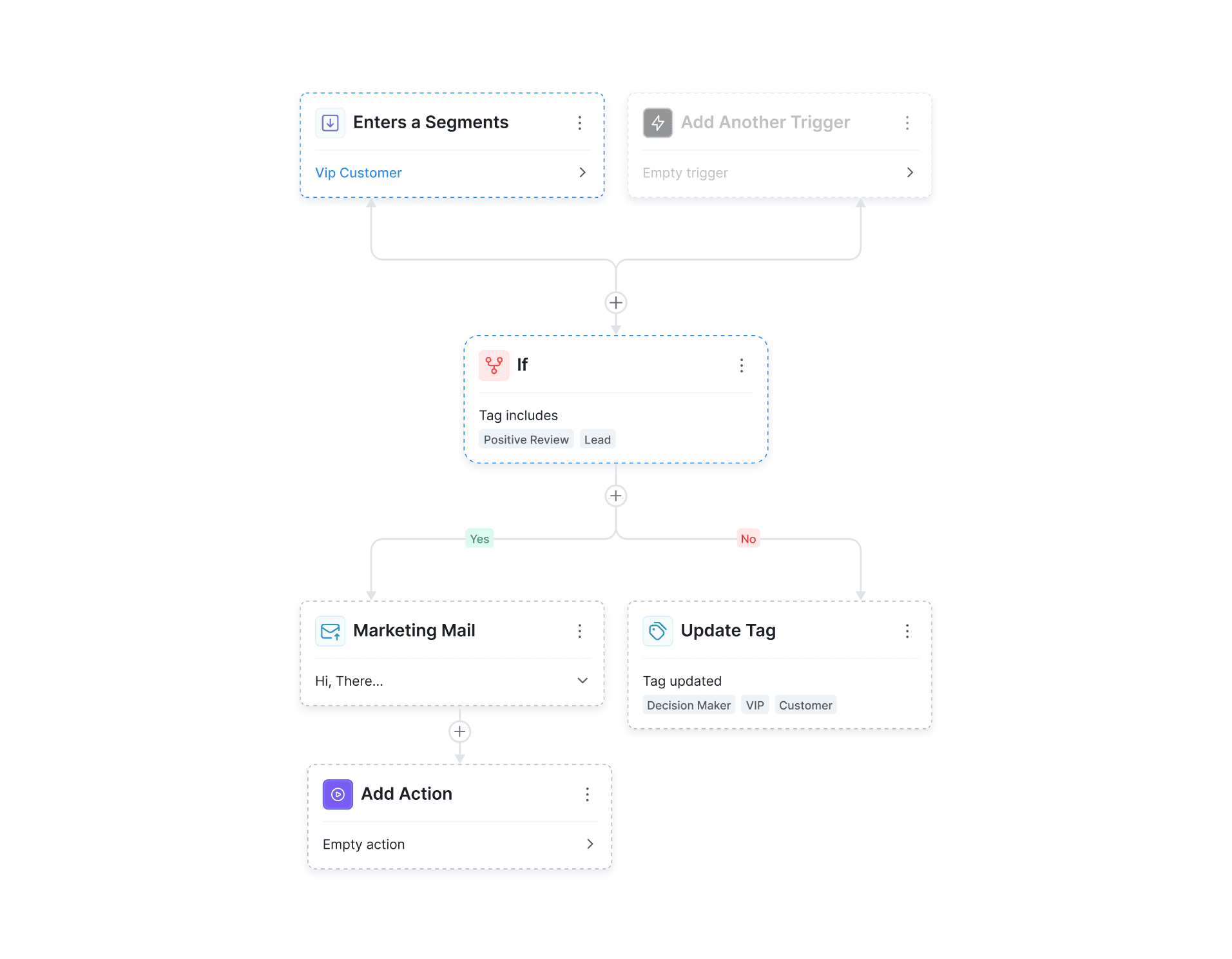
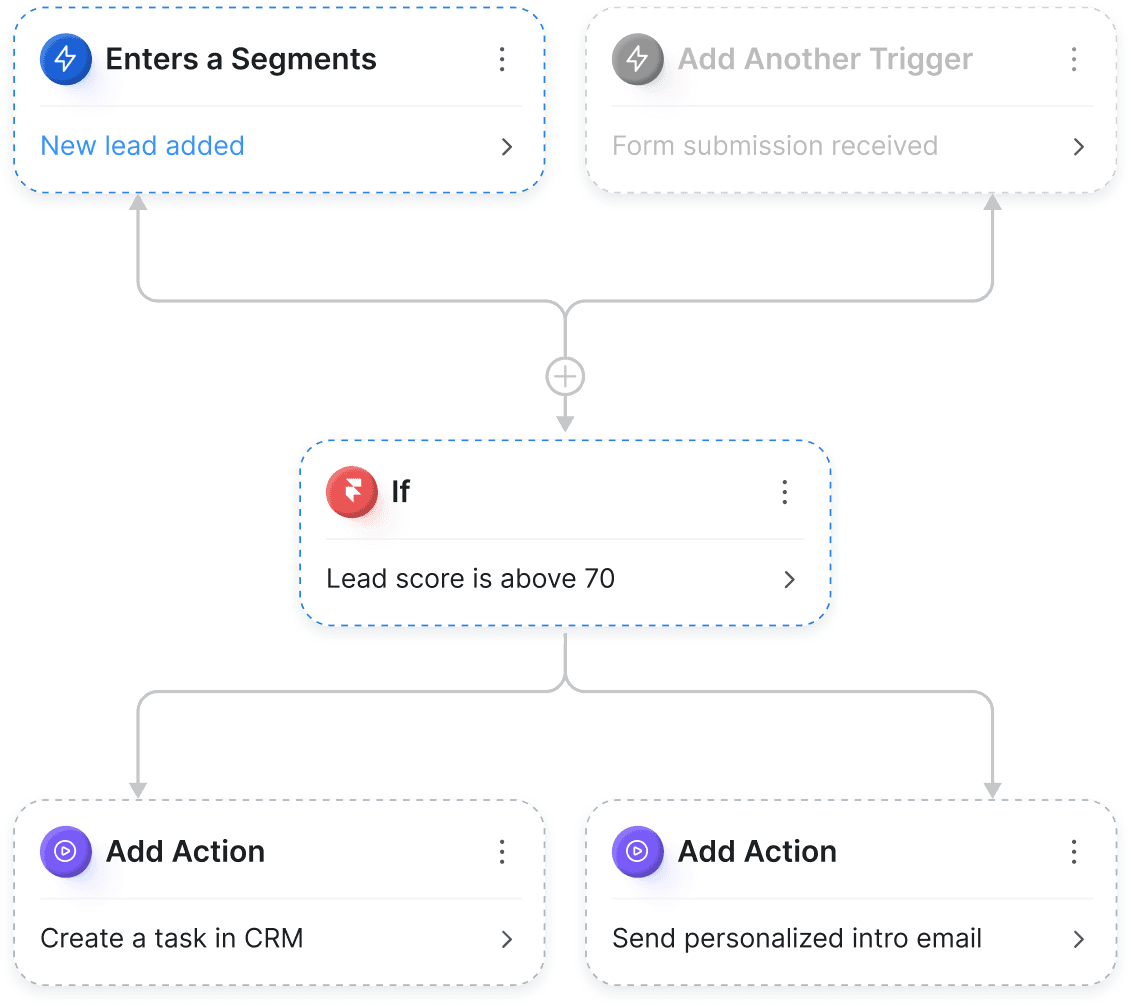
Diagram depicting different possible actions in a process, featuring arrows to indicate the flow between steps.

1.

Choose workflow start point

Set clear entry points using customer state, activity, or system signals to control exactly when automation kicks in.

2.

Condition-based automation

Build flexible if/else workflows that dynamically adapt in real time based on customer data and behavior patterns.

3.

Logic-based workflow paths

Define conditions and let ClovesAI intelligently handle what happens next, automatically and seamlessly.

 A monochrome design showcasing small dots arranged in a repetitive pattern against a white backdrop.
Two monitors featuring the add action interface and the add action buttons for functionality demonstration.
Diagram depicting different data types, highlighting structured, unstructured, and semi-structured data relationships.
Diagram depicting different possible actions in a process, featuring arrows to indicate the flow between steps.

1.

Choose workflow start point

Set clear entry points using customer state, activity, or system signals to control exactly when automation kicks in.

2.

Condition-based automation

Build flexible if/else workflows that dynamically adapt in real time based on customer data and behavior patterns.

3.

Logic-based workflow paths

Define conditions and let ClovesAI intelligently handle what happens next, automatically and seamlessly.

 A monochrome design showcasing small dots arranged in a repetitive pattern against a white backdrop.
Two monitors featuring the add action interface and the add action buttons for functionality demonstration.
Diagram depicting different data types, highlighting structured, unstructured, and semi-structured data relationships.
Diagram depicting different possible actions in a process, featuring arrows to indicate the flow between steps.

1.

Choose workflow start point

Set clear entry points using customer state, activity, or system signals to control exactly when automation kicks in.

2.

Condition-based automation

Build flexible if/else workflows that dynamically adapt in real time based on customer data and behavior patterns.

3.

Logic-based workflow paths

Define conditions and let ClovesAI intelligently handle what happens next, automatically and seamlessly.

Global impact

Real automation impact from real Cloves users

See how AI-powered workflows improve efficiency, increase revenue, and reduce manual workload across teams.

The CoreOS logo against a solid black background, highlighting its modern and sleek appearance.

“Cloves cut our manual work by more than 60%. We automate entire workflows while talking to customers, and the speed is unbelievable, saving hours every single day and boosting team productivity overall.”

Daniel Carter

Growth Manager

A professional woman in a business suit stands before a computer, poised for a task or meeting.
EasyTax logo against a white background, showcasing a professional and clean aesthetic.

“Cloves reduced manual work significantly. We automate workflows and respond faster than ever.”

A professional woman in a brown suit and glasses, exuding confidence and poise.
enlabs logo, representing a company that offers software and services tailored for the medical sector.

“Our team adopted Cloves quickly. The workflow feels natural and it removed a lot of operational friction.”

Foresight logo displayed prominently on a black background.

"Cloves is a powerful AI chat solution for businesses. Onboarding is fast, training is easy, and answers are accurate. A scalable tool we highly recommend globally."

Priya Sharma

Product Lead

0+

Countries

Active teams running workflows globally

0M+

Automations

Workflows executed every month

0+

Hours saved

Every manual work eliminated annually.

 Logo featuring an orange and black design representing the company’s brand identity.
he Seven logo displayed prominently within a bright yellow circle.
A square app icon displaying a grid of colorful squares arranged neatly.
App icon displayed in blue and white, characterized by a contemporary design.
 Bright sun icon against a bold orange backdrop, representing sunny weather and positivity.
Blue app icon featuring a prominent lightning bolt, representing speed or electricity.

Integrations

Connect with the daily tools you already use

Gray icon for the app, showcasing a circular element in the middle.
 Icon for the app, showcasing a unique design that reflects its functionality and brand identity.
Blue icon representing the app, consisting of three squares aligned together.
A cube icon set against a black background, highlighting its three-dimensional form.
A green backdrop with a bold "G" logo, symbolizing brand identity and recognition.
The letter "m" logo displayed prominently on a vibrant pink background.
App icon displayed in blue and white, characterized by a contemporary design.
A dark background adorned with numerous blue dots, creating a starry effect.

Cloves easily automates your steps

Connect your favorite tools, automate tasks, and let AI run complex workflows behind the scenes faster and smarter.

Create a free website with Framer, the website builder loved by startups, designers and agencies.